


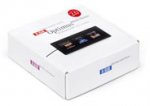
For the fans of the Optimus Keyboard it is not shocking to see a keyboard that has editable images on the keys that change with the software being used, but to people unfamiliar with the device it can be a good shocking experience. To get that effect to last longer I present you the Optimus mini 3, it is like a twin brother of the keyboard but like the name suggests, it’s only a mini with three keys.
There are plenty of features you can create with the 3 keys, besides being able to assign an image (animated or not) to each key, you can still do the following:
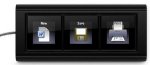
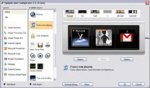
There are plenty of features you can create with the 3 keys, besides being able to assign an image (animated or not) to each key, you can still do the following:
- start a program, instead of going to “Start -> All Programs” you can just press the key and get the software running
- Set it as a keyboard combination – the people that copy/paste a lot would love to use this as it saves time and work, instead of always having to type “Control + c” and “Control + v”, they would just need to press 1 key at a time. Besides the copy and paste example there must be other good examples, like the shortcut keys at Photoshop or something similar
- Visualize the system status – it displays a graphic of the CPU Usage
- Display the webcam image
- Control software like IE, Word, Windows Media Player, Outlooks Express and more
- Display the time and weather


