


What do you have with you Nokia, Samsung, Sony Ericsson, Sharp, LG, Motorola, Siemens, XDA, Telstra ZTE, or else? Do you want to play YouTube videos on your mobile phones, adding fun to your gadget? Have you ever come across any problem when trying to play YouTube videos on your toy? Is that your situation, every time you are trying to play the YouTube videos on your 3G mobile, they are refused! What's the problem?
Well, the mobile on your phone supports to play videos in popular video format, like AVI, WMV, or MP4, or 3GP, 3G2, which is different with different cell phone. However, all the cell phones support the 3GP or 3G2 video play ing, which is good! The only thing is to convert YouTube videos to 3GP or 3G2 and synchronize them to your mobile phone.
You don't have to download the videos on YouTube, but convert them online and save to your computer with the desired videos in 3GP format.
The conversion is simply 3 steps, which is with several clicks only if you use Moyea SWF to video converter.
.
The download link is www.swfkits.com/swf_to_video/.
1. Input. Import your Youtube video URL: Click "V>From URL", copy and paste the URL in the box, and click "OK" to confirm.
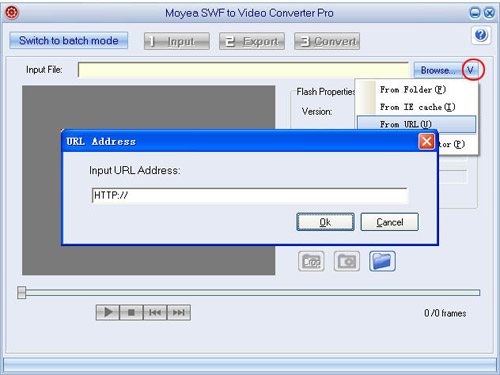
Tip: Please do not paste the address in your Address bar into the box, as sometimes the address doesn't take effects. Open Youtube.com and play your video, find "Embed" on the right pane, copy all the code, and paste it to a text book. In the book, find src= "......", past the content in the quotation marks into the box is OK.

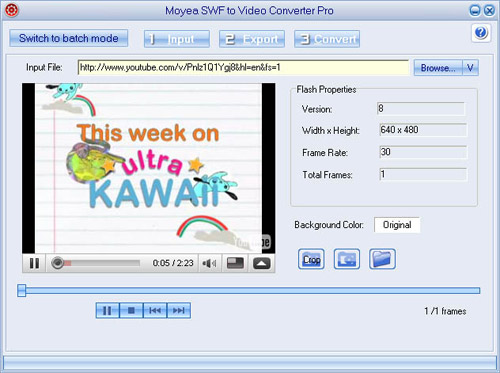
See the result:
Click the "Play" button to have a preview. May sometimes there is freeze and buffering, which is depending on the wire speed, when it is low, there will be freeze. Click "Export" to continue.
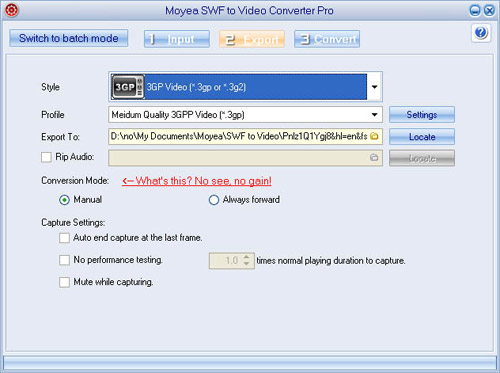
2. Export.
In "Style", select "3GP Video (*.3gp or *.3g2)"
In "ExportTo", select your destination folder.
Keep other items as the default.
3. Convert.
Click "Convert", "Play and capture", and then "Finish" to start the conversion.
Note:Because the SWF file from URL would be greatly influenced by internet speed, it is strongly recommended to click "Play Movie" to fully play the movie once before capturing.
Well, the mobile on your phone supports to play videos in popular video format, like AVI, WMV, or MP4, or 3GP, 3G2, which is different with different cell phone. However, all the cell phones support the 3GP or 3G2 video play ing, which is good! The only thing is to convert YouTube videos to 3GP or 3G2 and synchronize them to your mobile phone.
You don't have to download the videos on YouTube, but convert them online and save to your computer with the desired videos in 3GP format.
The conversion is simply 3 steps, which is with several clicks only if you use Moyea SWF to video converter.
.
The download link is www.swfkits.com/swf_to_video/.
1. Input. Import your Youtube video URL: Click "V>From URL", copy and paste the URL in the box, and click "OK" to confirm.

Tip: Please do not paste the address in your Address bar into the box, as sometimes the address doesn't take effects. Open Youtube.com and play your video, find "Embed" on the right pane, copy all the code, and paste it to a text book. In the book, find src= "......", past the content in the quotation marks into the box is OK.

See the result:
Click the "Play" button to have a preview. May sometimes there is freeze and buffering, which is depending on the wire speed, when it is low, there will be freeze. Click "Export" to continue.

2. Export.
In "Style", select "3GP Video (*.3gp or *.3g2)"
In "ExportTo", select your destination folder.
Keep other items as the default.

3. Convert.
Click "Convert", "Play and capture", and then "Finish" to start the conversion.
Note:Because the SWF file from URL would be greatly influenced by internet speed, it is strongly recommended to click "Play Movie" to fully play the movie once before capturing.

 iscount(20%-50%off)on HD(MTS/M2TS,MOD/TOD,TS,Blu-ray...)Converter.


