Here's what you do
1) Download part 1 of the rar archive

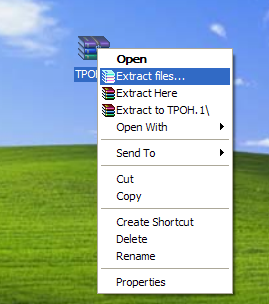
2) Once downloaded, right click on it, on the dropdown menu select
"Extract files..."
http://i120.photobucket.com/albums/o193/TheSaltinez3/2-2.png[/IMG
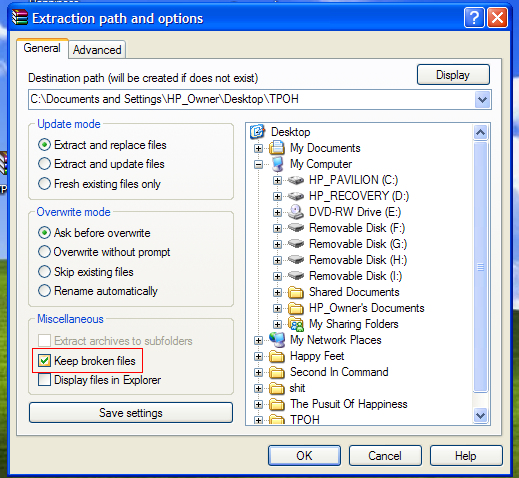
3) On the menu that comes up, check "Keep broken file".
[IMG]http://i120.photobucket.com/albums/o193/TheSaltinez3/3-2.png
4) Hit OK, it will start to extract (enter a password if needed) and once it gets to part 2 you will get the normal error message
5) Hit cancel, close, etc. Get the boxes out of the way.
6) There will be a new folder on your desktop, or where ever you choose to extract to, containing the folder and the first 15 minutes or so of the movie. You can watch part 1 while part 2 is downloading, etc.
This is also helpful for checking the quality of movies.
1) Download part 1 of the rar archive

2) Once downloaded, right click on it, on the dropdown menu select
"Extract files..."
http://i120.photobucket.com/albums/o193/TheSaltinez3/2-2.png[/IMG
3) On the menu that comes up, check "Keep broken file".
[IMG]http://i120.photobucket.com/albums/o193/TheSaltinez3/3-2.png
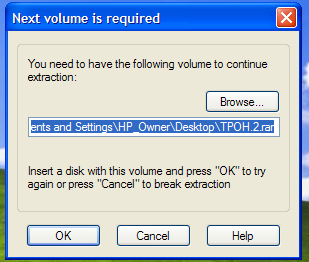
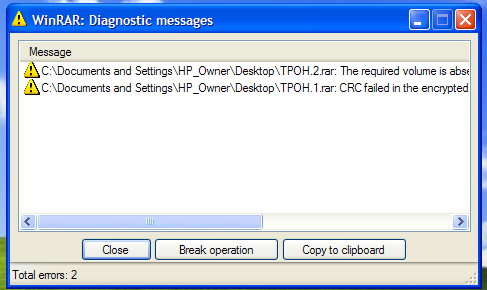
4) Hit OK, it will start to extract (enter a password if needed) and once it gets to part 2 you will get the normal error message
5) Hit cancel, close, etc. Get the boxes out of the way.
6) There will be a new folder on your desktop, or where ever you choose to extract to, containing the folder and the first 15 minutes or so of the movie. You can watch part 1 while part 2 is downloading, etc.
This is also helpful for checking the quality of movies.